The SPDT switch symbol appears on almost every schematic that routes signals between two destinations. It seems simple—one input arm points to two contacts—but reading it correctly will tell you exactly how current flows through the circuit. This guide explains what the symbols mean, how to read them, IEC vs ANSI versions, and how to draw them yourself.
What is SPDT Switch? (Single Pole, Double Throw Explanation)
SPDT stands for Single Pole, Double Throw. Simply:
- Single pole → one common input terminal (“pole”).
- Double throw → the input can be connected to either of the two output terminals.
So the SPDT switch has three terminals and acts as a switch (or selector): it sends a common path to either output A or output B, but never both at the same time. In British English, an SPDT used to control one light from two locations is called a two-way switch.
What is the SPDT Switch Symbol?
The SPDT switch symbol is a line (moving contact) that goes from one common terminal to two separate contacts. Common terminals are poles; both contacts were his throws. Arm position indicates which throw is connected to the pole.
You’ll also see it called the SPDT schematic symbol or the SPDT circuit symbol—they all refer to the same thing.
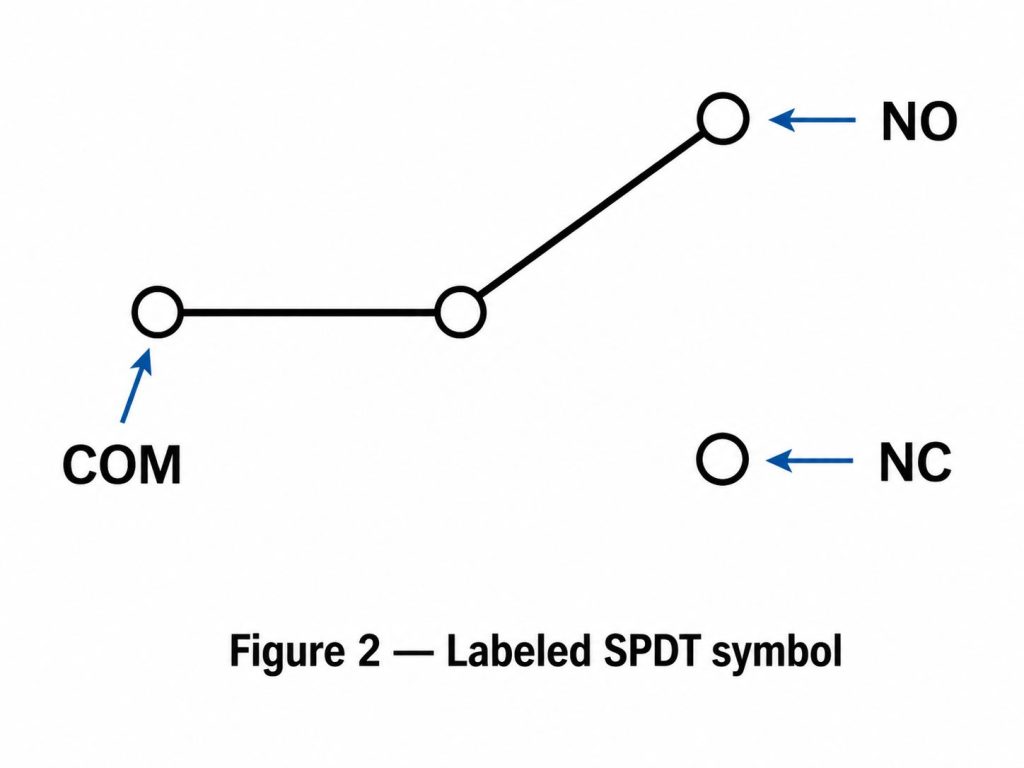
How to Read SPDT Switch Symbols: Pole Terminal and Two Throws
Read it in three steps:
- Locate the common terminal (pole). This is the single terminal where the moving arm begins—usually depicted as a dot or short line. Here’s your input.
- Locate the two throw terminals. These are the two contacts that the arm can reach. Those are your two possible outputs.
- Look at where the arm points. The arm indicates the current state of the switch—connected to either up throw or down throw.
The three terminals are usually labeled:
- COM – common (polar)
- NC — normally closed (connected to COM when the switch is idle)
- NO — normally open (connects to COM when switch is enabled)
SPDT is break-before-make by default: the arm leaves one throw before touching another, so both outputs never short-circuit simultaneously.
SPDT Switch Schematic Symbols: IEC vs ANSI/IEEE Standards
The SPDT symbol is nearly universal, but there are two standards that govern the details:
- IEC 60617 (international/Europe): describes the contact as a short bar or open mark, with a clean rotating line for the moving contact.
- ANSI/IEEE 315 (North America): very similar, usually with small open circles or dots for contact points.
In both standards, the logic is identical—one pole, two throws—so the schematic can be read either way. The differences are cosmetic: the shape of the contact points and the angle of the actuator lines.
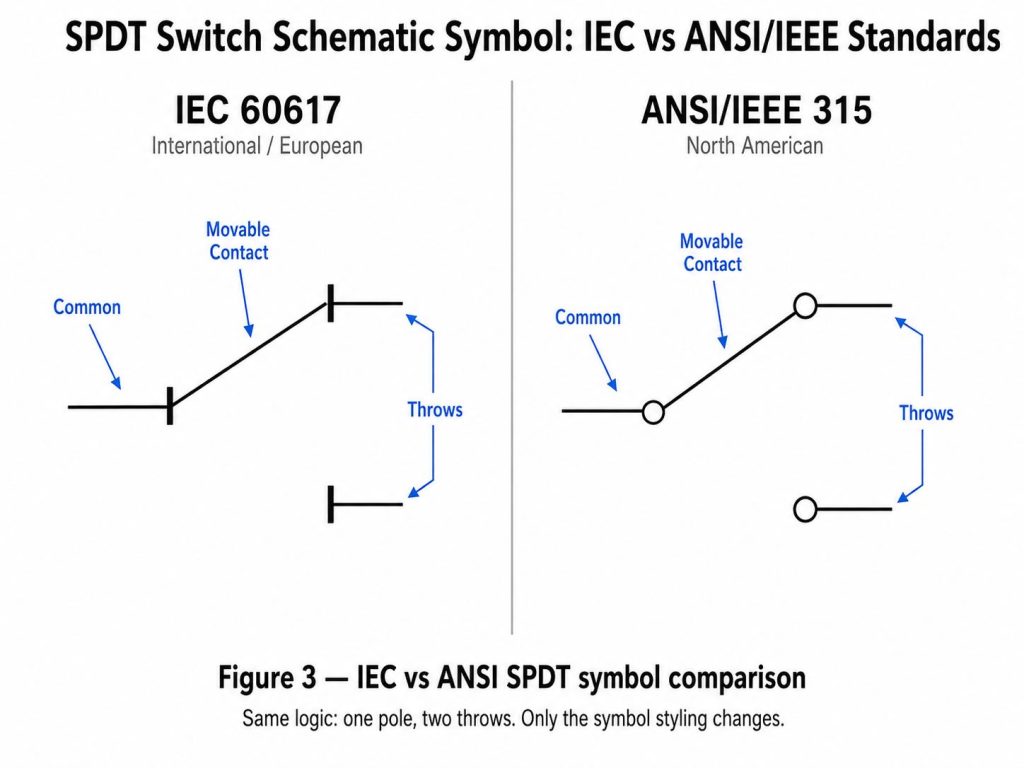
SPDT Symbols for Different Types of Switches: Toggle, Slide, Limit & Pressure
The same SPDT symbol is used no matter the physical switch, because it describes the function (one pole, two throws), not the actuator. Actuators can be displayed with additional markings:
- SPDT toggle switch symbol — standard rotating arm symbol; the most common form.
- SPDT slide switch symbol — the same contact, sometimes drawn with a small slider.
- SPDT limit switch symbol — the arm acquires a small roller/lever or actuator flag to indicate that the arm is mechanically tripped.
- SPDT pressure switch symbol — the actuator is depicted as a diaphragm or pressure symbol that moves the contacts.
The takeaway: find the pole and two throws first—the extra markings just tell you how the switch operates.
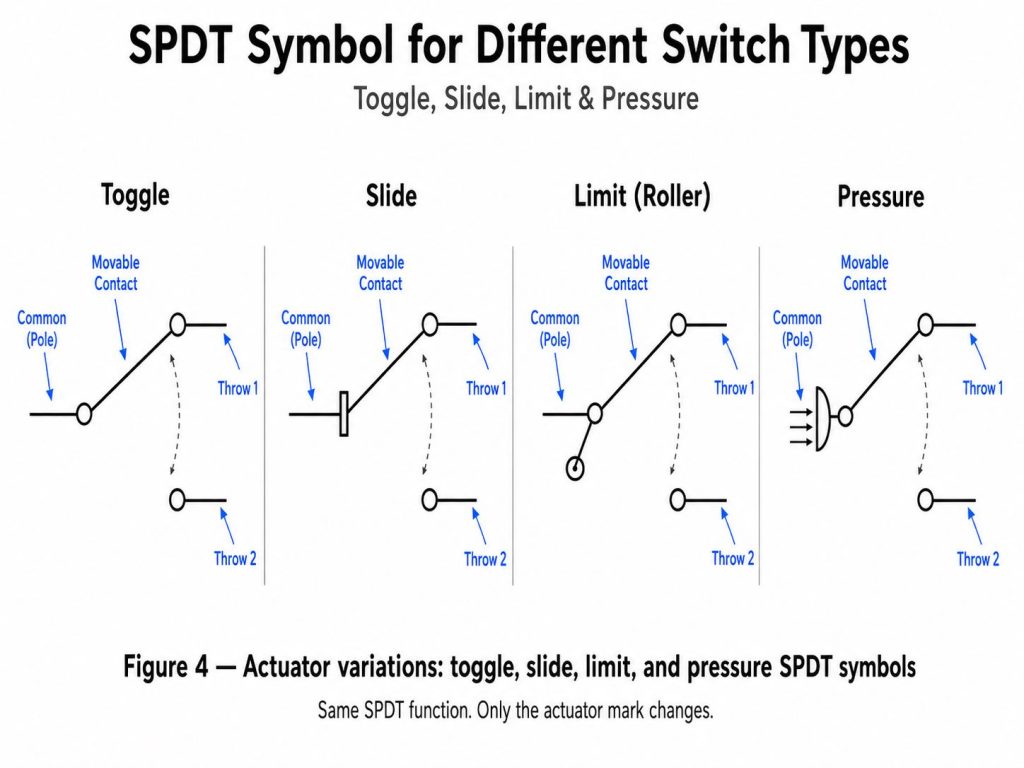
SPDT vs SPST vs DPDT: Switch Symbols Compared
The three are easy to differentiate once you count the poles and throws:
- SPST (Single Pole, Single Throw) — 1 pole, 1 throw, 2 terminals. Simple on/off switch; the symbol is one arm and one contact.
- SPDT (Single Pole, Double Throw) — 1 pole, 2 throws, 3 terminals. One arm chooses between two contacts.
- DPDT (Double Pole, Double Throw) — two SPDT switches operated together, 6 terminals. Depicted as two SPDT symbols combined with a dotted line showing the poles moving together.
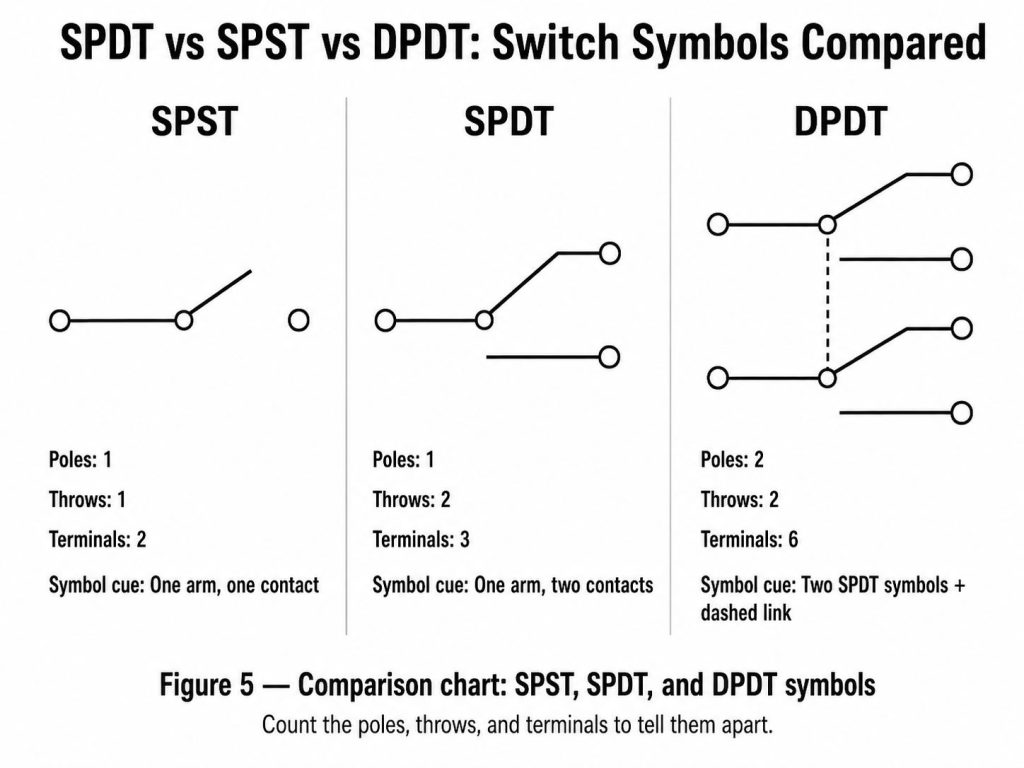
Comparison table:
| Switch Type | Poland | Throw | Terminal | Signal Symbol |
|---|---|---|---|---|
| SPST | 1 | 1 | 2 | One hand, one contact |
| SPDT | 1 | 2 | 3 | One arm, two contacts |
| DPDT | 2 | 2 | 6 | Two SPDT symbols + dotted link |
SPDT Relay Symbol vs SPDT Switch Symbol
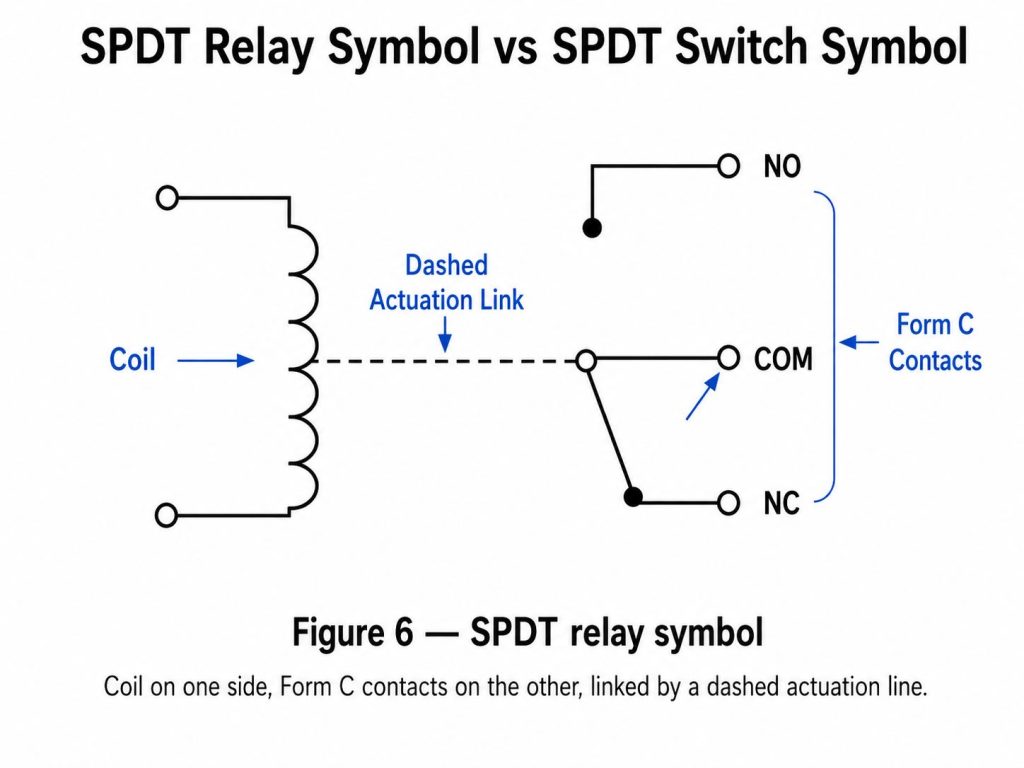
SPDT relays use the same set of contacts as manual SPDT switches—often called Form C contacts—but add a coil. The symbol indicates:
- A coil (rectangular or circular) that, when energized, moves the contacts.
- SPDT contact set: COM, NC, and NO.
When the coil is de-energized, COM is connected to NC. Energize the coil, and COM switches to NO. So the difference between the switch and relay symbols is only the additional coil and dotted line that connects it to the moving contact.
How to Draw SPDT Switch Symbols Step by Step
You can sketch the correct SPDT symbol in four steps:
- Draw the common terminals (poles) as dots or short lines on the left—these are the inputs.
- Draw two pitching contacts on the right, one on top of the other—these are the two outputs.
- Add an arm that moves from the pole, tilting it so it touches one of the two pitches.
- Label the terminals: COM on the pole, NC and NO on both throws.
For DPDT, draw two stacked poles and connect the poles with dotted lines. For the relay, add a coil and connect it to the arm with a dotted line.
FAQ About Switching SPDT Symbols
How many terminals does a SPDT switch have?
Three: one common throw (COM/pole) and two throws (often labeled NC and NO).
What do COM, NO, and NC mean in the SPDT symbol?
COM is the common pole (input). NC (normally closed) is connected to COM at rest. NO (normally open) is connected to COM when the switch is actuated.
Is an SPDT switch the same as a commutation switch?
Yes. “Changeover” and “two-way switch” (British English) both describe SPDT switches.
What is the difference between SPST and SPDT symbols?
SPST has one arm and one contact (2 terminals, on/off). SPDT has one arm and two contacts (3 terminals, choose between two outputs).
Can SPDT switches be used as SPST switches?
Yes—just use a common terminal and one throw, and leave the other throw unconnected.
Is a 2 way switch the same as a SPDT?
Yes. “2-way switch” is a common British term for SPDT switches, which are often used in stair lighting.
Designing an electronic PCB board that uses SPDT switches, relays, or other components? EBest Circuits (Best Technology) is an integrated PCB & PCBA contract manufacturer—send your Gerber and BOM files to [email protected] for a free DFM review.
Tag: Schematic Symbol, SPDT Switch, SPDT Switch Symbol, spdt switch symbol
This entry was posted on Thursday, May 28, 2026 at 18:19 and is under best PCB, best PCB, Electrical Components. You can follow any responses to this entry via the RSS 2.0 feed. You can skip to the end and leave a response. Ping is currently not allowed.
PakarPBN
A Private Blog Network (PBN) is a collection of websites that are controlled by a single individual or organization and used primarily to build backlinks to a “money site” in order to influence its ranking in search engines such as Google. The core idea behind a PBN is based on the importance of backlinks in Google’s ranking algorithm. Since Google views backlinks as signals of authority and trust, some website owners attempt to artificially create these signals through a controlled network of sites.
In a typical PBN setup, the owner acquires expired or aged domains that already have existing authority, backlinks, and history. These domains are rebuilt with new content and hosted separately, often using different IP addresses, hosting providers, themes, and ownership details to make them appear unrelated. Within the content published on these sites, links are strategically placed that point to the main website the owner wants to rank higher. By doing this, the owner attempts to pass link equity (also known as “link juice”) from the PBN sites to the target website.
The purpose of a PBN is to give the impression that the target website is naturally earning links from multiple independent sources. If done effectively, this can temporarily improve keyword rankings, increase organic visibility, and drive more traffic from search results.
